

Chrome extension / Security questionnaires
Answer buyer questionnaires
inside their portal
When a buyer sends a portal instead of a spreadsheet, the Security Questionnaire Assistant drafts cited answers grounded only in your approved policies and evidence, right where you have to type them.
Free · Chrome Web Store · Listed as “Screenata Security Questionnaire”
- Citations per answer
- ≤3
- Uncited answers
- 0
- Answers human-approved
- 100%
- On the Chrome Web Store
- Free
What it's for
Answers you can actually defend.
Features
What the Security Questionnaire Assistant does
Grounded in approved sources only
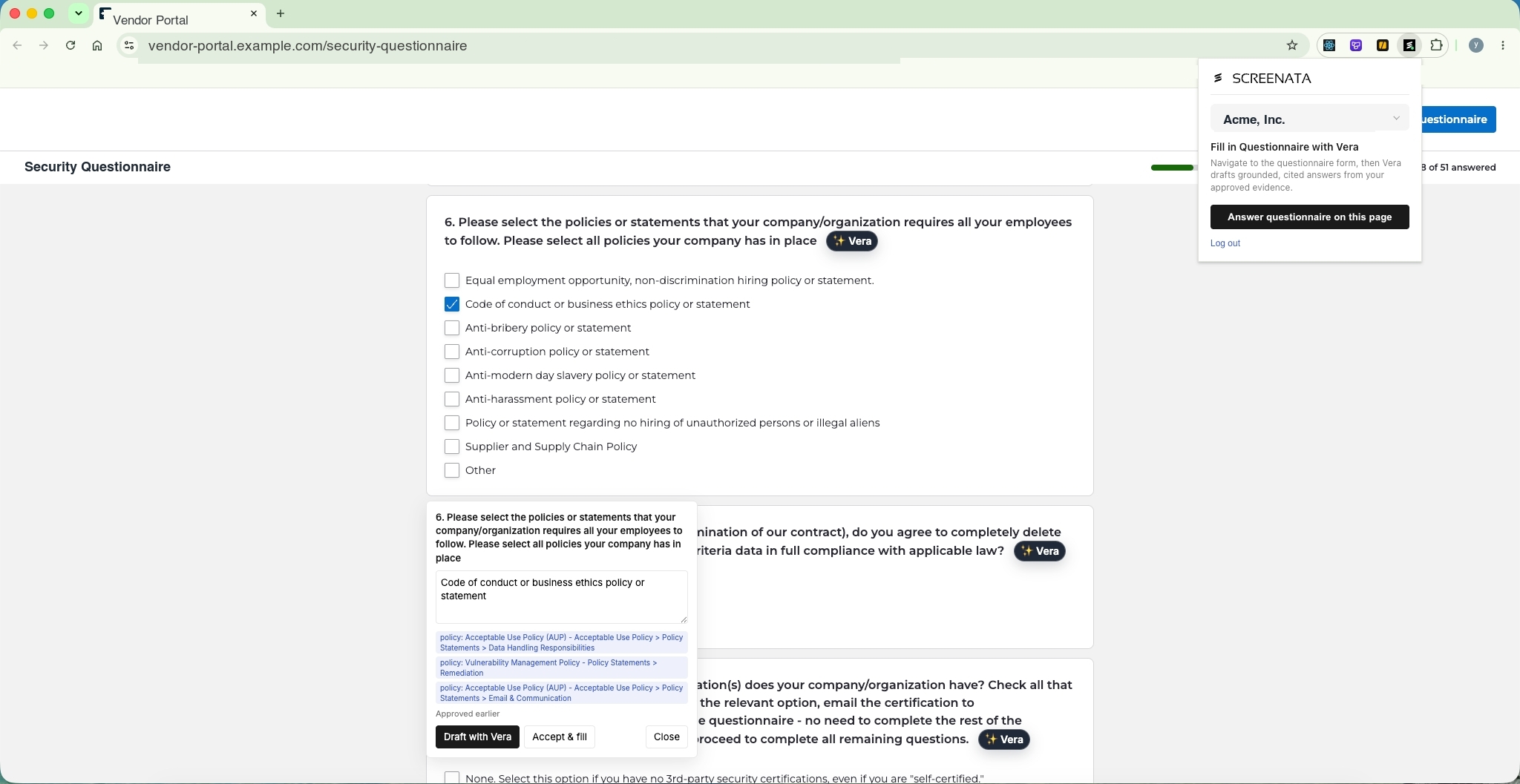
Retrieval hard-filters on approval state before anything is ranked: approved policies, approved and current evidence, and your own answer library. If no valid citation survives, the question is marked needs-info. No facts means no answer, period.
Fail-closed, never guessing
The assistant never invents a security posture you don't have. Every draft carries the exact policy or evidence behind it, so unapproved drafts and stale evidence can't leak into what you send a buyer.
Drafts right inside the buyer's portal
Buyer sent a web portal instead of a file? The extension recognizes the questions on the page and drafts the same cited answers directly in it, no copy-pasting between a spreadsheet and their form.
A review queue, not an autopilot
Every draft lands with its citations attached for a human to approve. Assign questions to the teammate who owns the domain, edit where needed, and nothing reaches the buyer without a sign-off.
An answer library that compounds
Approved answers join a reusable, workspace-scoped library keyed on the normalized question. The next questionnaire auto-answers everything you've already answered, so each deal makes the following one faster.
Round-trips spreadsheets too
Not every questionnaire is a portal. Upload XLSX, CSV, DOCX, or PDF and answers patch back into the buyer's original workbook with styles and merged cells preserved, the file you return looks like the one they sent.
Getting started
Install and answer in minutes
Step 01
Add to Chrome
Install the Security Questionnaire Assistant free from the Chrome Web Store and sign in with your Screenata workspace.
Step 02
Open the questionnaire
Open the buyer's portal, or upload their XLSX, CSV, DOCX, or PDF, and the assistant turns each row into a tracked question.
Step 03
Review and submit
Cited drafts appear for your team to approve or edit. Approved answers submit into the portal or patch back into the original file, and join your answer library.
Screenshots
See it in action
- Do you enforce MFA for all employees?Used 14×Approved
- Where is customer data hosted?Used 11×Approved
- How often are access reviews performed?Used 9×Approved
New upload matched 96 library answers automatically
Answer library
Every approved answer joins a workspace-scoped library keyed on the normalized question. The next questionnaire auto-answers everything you've already answered, so a fresh upload can match dozens of answers before you've read the first row, and each deal makes the following one faster.
Policy text“MFA is enforced for all employees”
ClaimCLM-018 · SOC 2 CC6.1
TestPR-15-T1 · Okta MFA enforcement
EvidenceEV-1987 · signed, fresh
Auditors hover any claim and land on the signed artifact
Citation chain
Every draft traces back through the exact policy text, the mapped claim, the test that verifies it, and the signed evidence behind it. Buyers and auditors can follow any answer to its source instead of taking your word for it, which is what makes a cited answer defensible.
Privacy & control
Trust and control
Human sign-off before anything is sent
The assistant drafts; it never submits on its own. Every answer passes through a review-and-approve queue, so a person always has the last word.
Answers you can defend
Because every answer cites an approved policy or a current piece of evidence, you can stand behind what you send, and show the buyer exactly where it came from.
Scoped to your workspace
The answer library and every source it draws from are scoped to your Screenata workspace. Nothing from another customer's data is ever in reach.
FAQ
Questions about the extension
- Is the Security Questionnaire Assistant free?
- Yes. The extension is free to install from the Chrome Web Store. It drafts answers from the approved policies, evidence, and answer library in your Screenata workspace.
- Which browsers are supported?
- The assistant runs in Google Chrome and Chromium-based browsers such as Microsoft Edge, Brave, and Arc.
- Will it submit answers automatically?
- No. The assistant drafts cited answers and routes them through a review-and-approve queue. Nothing reaches a buyer without a human sign-off, it's a copilot, not an autopilot.
- How does it avoid making things up?
- Retrieval is fail-closed. It hard-filters on approval state and only cites approved policies, current evidence, and previously approved answers. If nothing valid survives the filter, the question is marked 'needs info' rather than answered from a guess.
- What if the buyer sends a spreadsheet instead of a portal?
- Upload XLSX, CSV, DOCX, or PDF and the same cited drafting applies. On export, answers are patched back into the buyer's original workbook with styles and merged cells preserved.
Clear the next questionnaire in hours
Install the assistant, open the buyer's portal, and watch cited drafts appear where you have to type them.