

Compliance
Can Screenata Integrate with Jira, GitHub, or CI/CD for Continuous Compliance?
Screenata integrates with Jira, GitHub, and CI/CD pipelines to enable continuous compliance by triggering AI-driven evidence collection during the development lifecycle. This integration automates documentation for change management (CC7.2) and access controls (CC6.1), ensuring audit-ready evidence is captured at the moment of action.
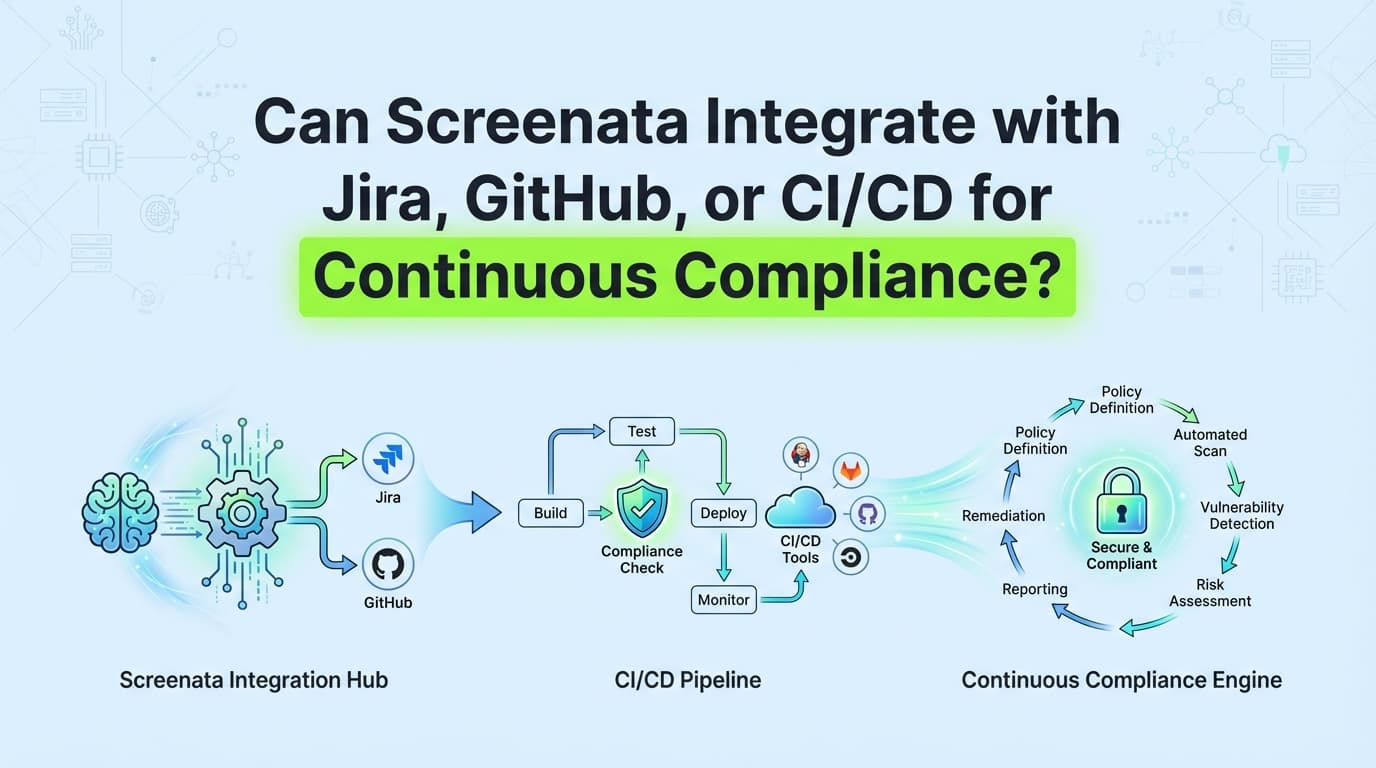
Screenata integrates with Jira, GitHub, and CI/CD pipelines via webhooks and native APIs to automate compliance as part of your development workflow. As an AI Compliance Officer for startups, Screenata doesn't just collect evidence, it reads your codebase, writes your policies, maps controls, and tracks your readiness score. By connecting to your development workflow, Screenata triggers AI agents to capture evidence the moment a pull request is merged or a ticket is closed. This ensures that evidence for controls like Change Management (CC7.2) and Logical Access (CC6.1) is captured continuously, eliminating the "audit crunch" and providing a real-time record of compliance.
Why Integration is Essential for Continuous Compliance
In the modern DevOps environment, software changes occur daily, if not hourly. Traditional compliance methods, where evidence is collected manually every quarter, cannot keep pace with this velocity. This creates a "compliance debt" where teams must retroactively document changes months after they occurred.
The Problem: The Disconnect Between Code and Compliance
Traditional compliance tools monitor infrastructure via API, but they cannot "see" what happens inside the application UI or the specific nuances of a manual approval process. Without integration:
- Evidence is missed: Changes are deployed without visual proof of the approval flow.
- Context is lost: Developers forget why a specific change was made by the time the audit starts.
- Manual overhead increases: Security teams spend 40–80 hours per audit cycle chasing down Jira tickets and GitHub screenshots.
The Solution: Trigger-Based Evidence Collection
By integrating Screenata with Jira, GitHub, and CI/CD, organizations move from "Point-in-Time" compliance to "Continuous Compliance." When an event occurs in your dev stack, Screenata's AI agents capture the necessary evidence and metadata immediately, and feed it back into your policies and readiness score.
How Screenata Integrates with GitHub
GitHub is the source of truth for code changes and access control logic. Screenata’s integration with GitHub focuses on automating the evidence for SOC 2 CC7.2 (Change Management) and CC7.3 (Deployment).
1. Triggering on Pull Request (PR) Merges
When a PR is merged in GitHub, Screenata can be configured to trigger an AI agent session. The agent navigates to the PR, captures the approval history, verifies that branch protection rules were followed, and generates a PDF evidence pack.
2. Automating Branch Protection Evidence
Auditors often require proof that main branches are protected. Screenata can periodically (or upon a GitHub webhook event) record the settings page of your repository to prove that "Require pull request reviews before merging" is enabled.
3. Change Management Mapping
| GitHub Event | SOC 2 Control | Screenata Action |
|---|---|---|
| PR Opened | CC7.2 | Logs the initiation of a change request. |
| Review Submitted | CC7.2 | Captures the identity of the reviewer and their comments. |
| PR Merged | CC7.3 | Generates a final Evidence Pack linking the code change to the approval. |
How Screenata Integrates with Jira
Jira serves as the primary workflow engine for access requests, bug tracking, and project management. Screenata integrates with Jira to automate the documentation of CC6.1 (Logical Access) and CC6.2 (User Provisioning).
1. Access Request Documentation
When a Jira ticket for "New User Access" is moved to "Done," Screenata can trigger a recording of the admin panel in the target system (e.g., Okta or AWS) to prove that the user was provisioned with the correct, least-privilege permissions.
2. Evidence Linking
Screenata automatically appends the generated Evidence Pack (PDF) back to the original Jira ticket as a comment or attachment. This creates a closed-loop system where the "Request" (Jira Ticket) and the "Proof" (Screenata Report) are permanently linked for auditors.
3. Example Workflow: Logical Access (CC6.1)
- Trigger: A Jira ticket for "Revoke Admin Access for User X" is closed.
- Action: Screenata launches an AI agent that logs into the application’s settings.
- Capture: The agent records the "Users" list, showing that User X no longer has Admin rights.
- Output: A timestamped PDF is generated and attached to the Jira ticket and synced to Vanta/Drata.
Integrating Screenata into CI/CD Pipelines
Modern CI/CD pipelines (GitHub Actions, GitLab CI, Jenkins, CircleCI) are the heartbeat of software delivery. Integrating Screenata here allows for Automated Regression Compliance.
1. Post-Deployment Verification
Once a build is successfully deployed to production, a CI/CD step can trigger Screenata to run a "Smoke Test" of key security controls. For example, the agent can verify that the "Admin Login" still requires MFA or that the "Public" folder is indeed restricted.
2. Compliance-as-Code
By adding a Screenata CLI command or API call to your .github/workflows/main.yml, you treat compliance evidence as a first-class citizen of your build process. If the evidence collection fails (e.g., the UI changed and the control is no longer visible), the build can be flagged for review.
3. Technical Implementation Example (GitHub Actions)
steps:
  - name: Deploy to Production
    run: ./deploy.sh
  - name: Trigger Screenata Compliance Capture
    run: |
      curl -X POST https://api.screenata.ai/v1/trigger \
      -H "Authorization: Bearer ${{ secrets.SCREENATA_API_KEY }}" \
      -d '{"control_id": "CC7.4", "environment": "production"}'
Comparison: Manual vs. Integrated Continuous Compliance
| Feature | Manual Process (No Integration) | Screenata Integrated Process |
|---|---|---|
| Evidence Timing | Quarterly or Annually | Real-time (at the moment of action) |
| Data Accuracy | High risk of human error/omission | 99% (Machine-captured metadata) |
| Developer Friction | High (Interrupts work for screenshots) | Zero (Automated background task) |
| Audit Readiness | Weeks of preparation | Always "Audit Ready" |
| Traceability | Disconnected files and folders | Linked directly to Jira/GitHub IDs |
Step-by-Step: Setting Up the Screenata-GitHub Integration
To enable continuous evidence collection for your change management process, follow these steps:
Step 1: Connect the Screenata GitHub App
Navigate to the Screenata Integrations dashboard and select GitHub. Authorize the Screenata App to access your repositories. This allows Screenata to listen for webhook events like pull_request.closed.
Step 2: Define the Trigger Logic
Specify which events should trigger a recording. For SOC 2 CC7.2, you would set:
- Event:
Pull Request Merged - Target Branch:
mainorproduction - Action: Launch AI Agent "Change Management Verifier"
Step 3: Map to Controls
Map the GitHub integration output to the specific control ID. For example, all merged PR evidence should be mapped to "Change Management" (CC7.2). If you also use Drata or Vanta, evidence can sync to those platforms too.
Step 4: Verify the Evidence Loop
Perform a test merge in GitHub. Observe the Screenata dashboard as the AI agent automatically starts, captures the PR approval, generates the evidence, and maps it to the relevant controls in your readiness dashboard.
Best Practices for Continuous Compliance Integrations
To ensure your integration scales and provides maximum value to auditors, follow these industry best practices:
- Use Descriptive Tagging: Ensure your Jira tickets and GitHub PRs use consistent tags (e.g.,
#compliance,#soc2). Screenata can use these tags to filter which events require automated evidence capture. - Enable PII Redaction: When capturing evidence from Jira or GitHub, ensure Screenata’s AI-powered redaction is active to blur out sensitive developer emails or internal IP addresses.
- Monitor Integration Health: Check the Screenata integration logs weekly to ensure webhooks are firing correctly. A failed webhook means a gap in your continuous evidence timeline.
- Incorporate Auditor Feedback: Show your auditor the integrated workflow early. Most auditors prefer this "Continuous" approach over folder dumps and will provide feedback on exactly which metadata fields they want to see in the automated reports.
Frequently Asked Questions
Does Screenata slow down my CI/CD pipeline?
No. Screenata triggers are typically asynchronous. Your CI/CD pipeline sends a "fire and forget" webhook to Screenata, which then handles the evidence collection on its own infrastructure. This ensures your deployment speed is never compromised.
Can I trigger Screenata from an internal, self-hosted Jira or GitHub?
Yes. Screenata supports webhooks from both cloud and on-premise (self-hosted) versions of Jira and GitHub, provided your firewall allows outbound traffic to the Screenata API.
What happens if a Jira ticket is closed but the AI agent fails?
Screenata features a "Retry and Alert" mechanism. If an integration trigger fails to produce evidence (e.g., the target application was down), the compliance team is notified via Slack or email to perform a manual capture or investigate the issue.
Do I need to write code to integrate Screenata?
No. While an API is available for advanced CI/CD use cases, most Jira and GitHub integrations are "No-Code." You can set up the triggers and mappings entirely through the Screenata UI.
Key Takeaways
- ✅ Real-Time Evidence: Integration moves compliance from a quarterly burden to a real-time, background process.
- ✅ Zero Developer Friction: Developers keep using Jira and GitHub as usual while Screenata handles the documentation.
- ✅ Closed-Loop Traceability: Evidence is automatically linked to the source ticket or pull request, providing a perfect audit trail.
- ✅ Framework Versatility: One integration can provide evidence for SOC 2, ISO 27001, and HIPAA simultaneously.
- ✅ Complete Solution: Screenata replaces both the GRC platform and the compliance consultant. If you already use Drata or Vanta, it works alongside them. For teams starting fresh, it's everything you need. See the cost breakdown.
Learn More About GRC Platform Integration
For more on integrating evidence automation into your workflow, see our guide on automating SOC 2 evidence collection. Learn why you probably don't need a vCISO for SOC 2 and why generic ChatGPT policies fail audits.
Connect and see
See your SOC 2 with your real systems.
Connect GitHub and cloud read-only. Vera shows your control matrix, policy gaps, and prioritized next actions before you commit to anything.